
TL;DR

Get pool and patio gear delivered free with Prime
- Fast, free delivery on millions of items
- Prime Video, Amazon Music and more included
- Member-only deals all year
Building your own AI workstation used to be cheaper, but in 2026, prebuilt systems often match or beat DIY prices due to component shortages and bulk buying. The decision now hinges more on support, reliability, and customization needs than just cost.
Imagine you’re ready to deploy a high-powered AI workstation. Do you build it yourself, pulling all the levers of cooling, power, and component selection? Or do you buy a prebuilt, saving time and avoiding hassle? Well, in 2026, that choice just got a lot more complicated.
The old rule was simple: building was cheaper, buying was faster. But now, skyrocketing component prices and supply chain hiccups have flipped that script. The AI boom is driving up the cost of GPUs, RAM, and SSDs — making it harder to beat a vendor who bought in bulk. So, this isn’t just about saving a few dollars; it’s about weighing cost, time, support, and control in a new way. Let’s explore what that means for your next AI setup.
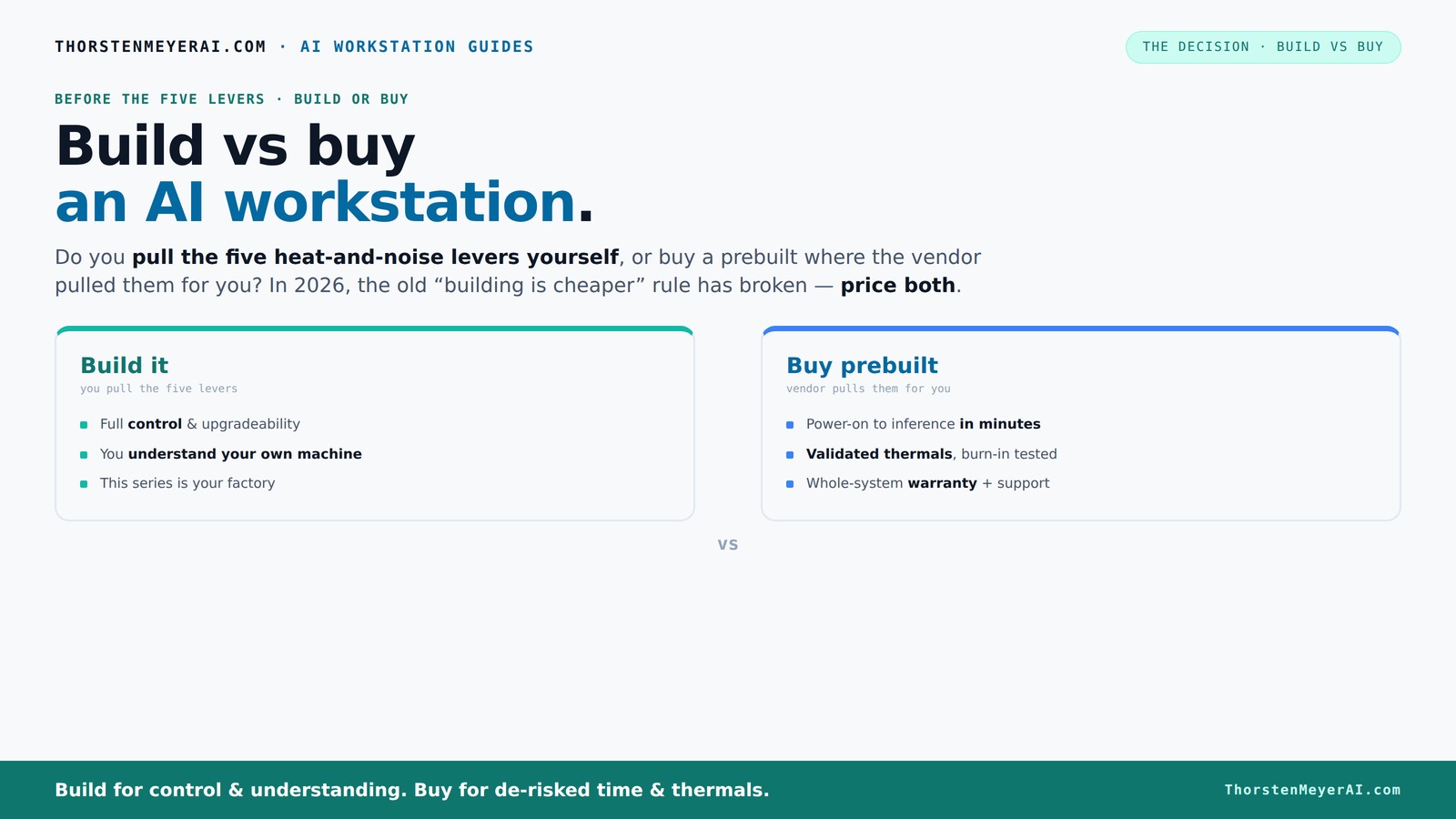
Build vs buy
an AI workstation.
The real question behind this whole series: do you pull the five heat-and-noise levers yourself, or buy a prebuilt where the vendor pulled them for you? And in 2026, the old “building is cheaper” rule has broken. Match your situation in Part 3.
Key Takeaways
- In 2026, component shortages have leveled the playing field — prebuilts often match or beat DIY prices for equal specs.
- The decision hinges more on support, thermal validation, and upgradeability than just cost savings.
- Prebuilts save time and reduce risk through factory-validated thermals and support plans, perfect for urgent or mission-critical workloads.
- DIY builds offer control, customization, and the chance to learn, especially if you enjoy tuning your system for peak AI performance.
- Focus on GPU VRAM, PSU capacity, cooling, and motherboard expandability to future-proof your AI workstation.
high performance AI workstation prebuilt
As an affiliate, we earn on qualifying purchases.
As an affiliate, we earn on qualifying purchases.
Why Cost Isn’t the Only Factor Anymore: The 2026 Price Shift
Building a high-end AI workstation used to be a no-brainer for saving cash. Today? Not so much. Because of global shortages and supply chain snarls, component prices like GPUs and DDR5 RAM have spiked. What used to cost $1,000 now often pushes above $1,250 — even before adding a Windows license.
Meanwhile, prebuilt vendors—like Lambda, Puget, and BIZON—secured bulk discounts early in the shortage. They pass some savings onto you, sometimes beating DIY prices for similar specs. So, the old rule of thumb — build cheap, buy fast — no longer holds true. Instead, you need to compare exact configurations, factoring in current prices.
Real-world example: A recent build with a RTX 4090, 128GB RAM, and fast NVMe drives costs about $1,500 if you buy parts. But a prebuilt with similar specs from Lambda or Puget often lands around $1,400–$1,450, with warranty included. That’s a game-changer.
The Core Question: Who Pulls the Levers—You or the Vendor?
Building your own AI workstation means you’re the one tuning the system—adjusting fans, undervolting GPUs, optimizing airflow. It’s a DIY puzzle, but one that gives you total control. Want a whisper-quiet machine? You set the fans and cooling.
Buying prebuilt shifts that work to the vendor. Companies like BIZON or Lambda do the thermal engineering for you—validate that your system runs cool under load, run burn-in tests, and tune fan curves. Sometimes, they even include water cooling for quieter operation. You pay a premium, but you skip the hassle of trial and error.
For example, a prebuilt might come with a factory-verified setup that runs 30% cooler and quieter than a DIY system. If you’re not into tweaking fan curves or replacing thermal paste, that’s worth paying for. If you love the process, building your own might still appeal—but for most, the vendor’s “levers” are a huge advantage.
When a Prebuilt AI Workstation Makes the Most Sense
If you value quick setup and reliable performance, prebuilt is your best bet. Imagine you need a system that’s ready to run AI models right out of the box. A prebuilt from a trusted vendor comes with the OS, drivers, and AI stack already installed. Just power on and start training or inference.
Suppose you’re working on a tight deadline. Waiting days or weeks to source, assemble, and troubleshoot parts isn’t practical. Instead, a prebuilt guarantees compatibility, validated thermals, and solid support if something goes wrong.
For instance, a multi-GPU rig designed for AI training might take hours to assemble and tune. A prebuilt from Lambda can be ready in a day, with a 3- or 5-year warranty that covers hardware failures. That peace of mind often outweighs a few hundred dollars in potential savings.
When Building Yourself Is Still the Smarter Move
Are you a hobbyist, student, or a professional who loves tinkering? Building your own AI workstation still offers significant perks. You control every component—choosing quieter GPUs, better power supplies, or specific motherboards for expandability.
Imagine you want a machine with the latest Nvidia RTX 4090 and 256GB of RAM, optimized for your specific AI models. Doing it yourself lets you pick parts that fit your exact needs, and you’ll learn how to tune it for maximum performance and minimal noise.
Plus, future upgrades become easier. Using standard ATX parts means swapping out components down the line is straightforward. You also avoid vendor lock-in or proprietary connectors—making your system more flexible in the long run.
For example, a hobbyist who builds a system with a good quality PSU, a quiet CPU cooler, and a case with excellent airflow can outperform a prebuilt at the same price—if they’re willing to invest time learning the trade.
The Key Components That Make or Break Your AI Workstation
For AI workloads, certain parts matter more than others. The GPU is king—VRAM capacity determines how large models you can run. A 24GB VRAM GPU handles most inference tasks, but training bigger models often needs 48GB or more.
Power supplies must have enough headroom—aim for at least 20% extra capacity. A 1000W PSU is often needed for high-end multi-GPU setups. Cooling is equally critical; a poorly cooled system throttles performance and shortens component lifespan.
Motherboards should support future upgrades—look for plenty of PCIe slots, RAM slots, and robust power delivery. Storage? Fast NVMe SSDs reduce data bottlenecks, but you don’t need massive capacity for training—just fast access.
Real example: A system with a RTX 4090 (24GB VRAM), 128GB DDR5 RAM, and a high-quality 1200W PSU ensures stability during long training runs. If you want to upgrade later, check for compatibility first.
Upgradeability and Support — What to Expect from Prebuilts and DIY
Upgrading your AI workstation later depends on how well the original system was built. Prebuilts from top vendors often use standard parts, making upgrades easier—adding RAM, swapping GPUs, replacing drives.
However, some OEMs use proprietary connectors or layout tricks that hinder upgrades. Always verify whether you can upgrade your system without major disassembly or compatibility issues.
Support is another big factor. Prebuilts usually come with a support plan—warranty repairs, quick turnaround, and expert troubleshooting. DIY? You’re on your own or rely on community forums and manufacturer warranties.
For example, a DIY build with a standard ATX motherboard lets you swap GPUs or add storage in minutes. A prebuilt with proprietary parts might require special cables or even sending the whole system back for upgrades.
What AI-Specific Features Matter in Your Choice
AI workstations today aren’t just powerful—they’re smarter. Prebuilts often come with ISV-optimized software, NPU-aware features, and on-device AI accelerators. These boost performance, reduce power consumption, and simplify workflows.
For example, using hardware that supports Nvidia’s AI SDKs or Intel’s NPU features can speed up inference tasks by 20–30%. Some systems even support virtualized AI environments or deepfake detection as built-in features.
On the other hand, DIY builders can add specialized cards or tune BIOS settings to enable these features. The key is knowing what your workload needs and whether your system supports it out of the box.
Frequently Asked Questions
Is it really cheaper to build my own AI workstation in 2026?
Not always. Due to component shortages and bulk buying, prebuilt systems often cost the same or less for similar specs. Always compare current prices for your specific configuration before deciding.
Will a prebuilt perform worse than a DIY build at the same price?
Not necessarily. Many prebuilts are tested for thermal performance and stability, sometimes outperforming DIY setups that lack fine-tuned cooling or validation. It depends on how well each system is assembled and optimized.
Are prebuilts reliable for long AI training or 24/7 workloads?
Yes, when purchased from reputable vendors. They undergo burn-in testing, have validated thermals, and include support plans, which reduces downtime and maintenance worries over long runs.
What components should I prioritize for AI workloads?
GPU VRAM is most critical, especially for large models. Adequate PSU capacity (at least 20% headroom), efficient cooling, and expandable motherboards also matter for stability and future upgrades.
Can I upgrade a prebuilt later without major issues?
It depends. Standard parts are usually upgradeable, but proprietary connectors or layouts can complicate things. Check with the vendor about upgrade policies before buying.
Conclusion
Choosing between build and buy isn’t just about dollars anymore—it's about what matters most to you: speed, support, or control. With market shifts and technological advances, the smart move is to evaluate your needs carefully.
In 2026, the best AI workstation is the one tailored to your workflow, whether that’s a ready-to-go prebuilt or a custom-built machine you can tweak and upgrade for years to come. The key is knowing which levers to pull.
Evergreen bestsellers Picks
bestsellers
As an affiliate, we earn on qualifying purchases.