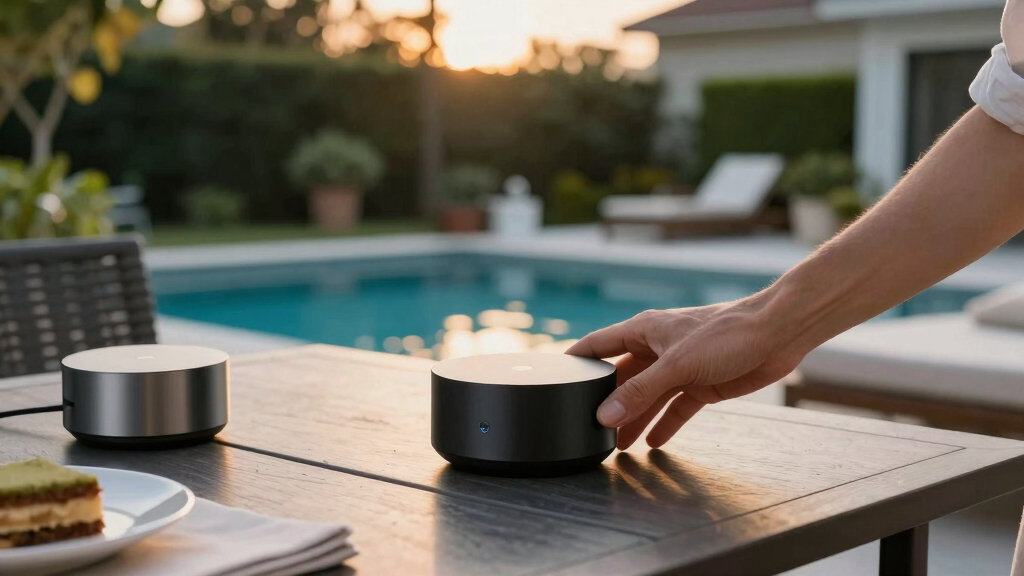

Innovative smart home gadgets are transforming the way we live, offering smarter control, automation, and convenience. The SwitchBot Hub 3 stands out as the best overall for its versatility and compatibility across platforms. For those seeking advanced sensors, the THIRDREALITY Smart Presence Sensor R3 offers precise motion detection, while the Amazon Echo Show 5 delivers a powerful smart display experience. Each of these options balances features with tradeoffs like cost, complexity, or ecosystem lock-in. Keep reading for a detailed breakdown to find the best fit for your smart home upgrade.

Get pool and patio gear delivered free with Prime
- Fast, free delivery on millions of items
- Prime Video, Amazon Music and more included
- Member-only deals all year
Key Takeaways
- The best devices blend broad compatibility with easy setup, making them accessible for most users.
- Sensors and automation hubs are key to creating truly responsive smart environments, but they often come with higher costs or complexity.
- Smart switches and fingerbots offer simple, non-intrusive ways to automate existing appliances without wiring changes.
- Display devices like the Echo Show provide visual feedback and smart control, but may be less suited for minimalist setups.
- Choosing between WiFi, Zigbee, or Bluetooth depends on your existing devices and desired range or reliability.



More Details on Our Top Picks
SwitchBot Hub 3 (3rd Gen), Smart Home Hub with 2.4″ IPS Screen & Knob Control, WiFi Thermometer Hygrometer, IR Remote (Matter/Bluetooth 200m), Alexa/Google/Apple Home Compatible
This hub stands out for its ability to unify a wide array of devices—over 100,000 IR appliances, SwitchBot ecosystem products, and Matter-compatible gadgets—making it a versatile command center. Compared to the Amazon Echo Show 5, which mainly focuses on smart display functions, the SwitchBot Hub 3 offers a physical control dial and scene buttons that make daily interaction more tactile and accessible. Its IPS screen provides a clear, glanceable overview of indoor and outdoor conditions, which is a major plus for those who value a visual home dashboard. However, the reliance on the 2.4GHz Wi-Fi band can pose connectivity challenges with dual-band routers, requiring manual switching. The hub’s limitation to IR devices means it can’t control RF appliances like ceiling fans or garage doors, which could be a drawback for some users. Overall, this pick is best suited for homeowners seeking a centralized, physical interface that consolidates multiple smart devices into one app and scene setup.
Pros:- Supports over 100,000 IR appliances and Matter devices, broad compatibility
- Vivid IPS display with real-time home data and weather info
- Physical dial and scene buttons for easy, tactile control
Cons:- Limited to infrared devices, cannot control RF gadgets like ceiling fans
- Requires a stable 2.4GHz Wi-Fi connection, which can be problematic with dual-band routers
Best for: Homeowners who want a comprehensive, tactile control point for their IR appliances and Matter-compatible devices, with a visual status dashboard.
Not ideal for: Users with many RF-controlled devices or those who prefer voice-only control without physical interfaces, as the hub doesn’t support RF or voice commands directly.
- Control Range:WiFi 200m, Bluetooth
- Display:2.4-inch IPS screen
- Compatibility:Matter, Bluetooth, Alexa, Google, Apple Home
- Sensors:Temperature & humidity (±0.2°C)
- Control Modes:IR, Scene buttons, Knob control
- Power:WiFi powered
Bottom line: This hub is ideal for tech-savvy homeowners seeking a unified, physical and visual control station for their diverse smart home devices.
Amazon Echo Show 5 (newest model), Smart display, Designed for Alexa+, 2x the bass and clearer sound, Charcoal
This compact device makes a strong case for users prioritizing visual interaction and multimedia, offering a 5.5″ touchscreen for news, weather, and video calls. Compared with the SwitchBot Hub 3, which excels in device centralization, the Echo Show 5 focuses on multimedia, smart display, and voice interaction, adding a visual element to Alexa’s voice commands. Its smaller size makes it perfect for nightstands, kitchens, or desks without sacrificing sound quality, thanks to doubled bass and clearer audio. The built-in camera, with privacy features like a shutter and mic off button, supports security and family connectivity. Nevertheless, its reliance on WiFi and Alexa ecosystem might limit integration with non-Amazon devices, and it lacks tactile controls found on the Hub 3. This makes it ideal for users wanting a simple, visually rich Alexa interface for quick info and entertainment in tight spaces.
Pros:- Compact 5.5″ display with vivid visuals for news, weather, and photos
- Enhanced sound with deeper bass and clearer vocals
- Built-in 2 MP camera with privacy shutter and encrypted video
Cons:- Limited smart home device compatibility—mostly Alexa ecosystem
- No tactile controls or physical scene buttons
Best for: Individuals wanting a small, multimedia-focused Alexa device for quick updates, calls, and smart home control without needing physical controls.
Not ideal for: Homeowners seeking a central hub for device automation or control over IR appliances, as it does not support IR or extensive device integration beyond Alexa-compatible products.
- Display Size:5.5 inches
- Speaker:Enhanced bass, clearer sound
- Camera:2 MP with shutter
- WiFi:Dual-band 802.11 a/b/g/n/ac
- Dimensions:5.8 x 3.6 x 3.2 inches
- Weight:16.1 oz
Bottom line: This device is perfect for users who want a small, multimedia-rich Alexa companion for quick info, calls, and light control in tight spaces.
Fingerbot Touch (Bluetooth, Rechargeable) Touchscreen Button Presser, Automates Touch Panels, App Control, Compatible with Alexa/Google Home via Hub, Timer & Schedule
This tiny device excels at turning manual buttons and touch screens into automated, remotely controlled actions—ideal for smart home setups that include devices like tablets, wall switches, or appliances with touch controls. Compared to the MOES Fingerbot 2packs, the Fingerbot Touch offers a more precise, human-like microcurrent touch, which allows for flawless automation of devices needing gentle presses. Its rechargeable battery and simple app setup mean no wiring or complicated installation, making it accessible for non-technical users. Its compatibility with Alexa and Google via a hub extends its automation potential, though it requires the Tuya Smart app and a Bluetooth hub for remote access. The main tradeoff is that it’s limited to touch-based controls and doesn’t directly operate IR or RF appliances. This pick suits users who want to automate manual touch buttons or touchscreens effortlessly.
Pros:- Precise human-like microcurrent touch for flawless automation
- Rechargeable, no wiring needed
- Easy app setup with timer and schedule functions
Cons:- Limited to touch-based devices, cannot control RF gadgets
- Requires a Tuya hub for remote control and voice integration
Best for: Homeowners with manual or touch-based devices like tablets and switches who want easy, remote automation without rewiring.
Not ideal for: Homes with many RF-controlled appliances or requiring voice control without a hub, as it doesn’t support RF or direct IR control.
- Control Method:Touch (microcurrent)
- Connectivity:Bluetooth
- Rechargeable:Yes
- Compatibility:Alexa, Google via Hub
- Size:Approx. 1.5 x 1.5 x 1.1 inches
- Weight:2.39 ounces
Bottom line: This device makes automation of manual touch buttons straightforward for users who want a simple, remote-controlled solution.
THIRDREALITY Smart Presence Sensor R3, 60GHz mmWave Radar, USB-C Powered, RGB Light with Status Indication, Illumination Sensor, Zigbee Repeater, Compatible with Home Assistant(ZHA&Z2M), SmartThings
This sensor leverages 60 GHz mmWave radar technology to detect human presence with remarkable accuracy, even when stationary—ideal for quiet rooms like bedrooms and bathrooms. Compared to the eMotion Ultra radar sensor, the R3’s integration as a Zigbee device doubles as a mesh extender, increasing network reliability, which is a big plus for larger or complex smart homes. Its RGB indicator provides visual status cues, making occupancy and system states easy to verify at a glance. The environmental sensors for light and air quality add layers of automation and insight, though support for Lux and TVOC depends on your platform. Its USB-C power offers stable operation without batteries, but placement flexibility is limited by the need for a power source. This sensor is best suited for those who want precise presence detection combined with environmental awareness and Zigbee mesh expansion.
Pros:- Highly accurate presence detection even while stationary
- Built-in RGB light for status indication and automations
- Functions as a Zigbee repeater to extend network coverage
Cons:- Requires USB-C power, limiting placement options
- Advanced features like Lux and TVOC depend on platform support
Best for: Homeowners seeking highly accurate presence detection integrated with environmental sensors and Zigbee network strengthening.
Not ideal for: Users with simple motion detection needs or those who prefer battery-powered sensors, since it requires USB-C power and Zigbee hub integration.
- Detection Method:60 GHz mmWave radar
- Power:USB-C (5V/1A)
- Range:Up to 6 meters
- Zigbee:Yes, acts as repeater
- Environmental Sensors:Light, air quality
- Size:1.42 x 2.64 x 2.76 inches
Bottom line: This sensor is tailored for smart home enthusiasts who want precise occupancy detection with environmental data and network expansion capabilities.
MOES Rock Switch Fingerbot 3rd Generation, Timer Control Work with Smart Life App, Add MOES Tuya Bluetooth Hub Make it Compatible with Alexa and Google Home
This Fingerbot excels at transforming existing rocker switches and physical buttons into smart controls with minimal effort. Its upgraded design in 2025 enhances compatibility with various switch types, setting it apart from older models. The included timer and scheduling features make it ideal for automating routine tasks, while the optional Tuya Bluetooth Hub extends control remotely and via voice assistants. Compared with the SwitchBot Fingerbot Touch, this model offers better retrofit options and longer battery life, though it requires a BLE hub for remote access, adding a layer of complexity. Its Type-C rechargeable battery provides nearly six months of use per charge, making it a reliable choice for busy households. While installation takes seconds, the need for the BLE hub for remote voice control is a tradeoff for seamless local operation without wiring.
Pros:- Easy 5-second installation with adhesive
- Extended battery life up to six months
- Works well with Alexa and Google Home when paired with the BLE hub
- Can retrofit a variety of switches and buttons
Cons:- Requires separate BLE hub for remote control and voice commands
- Limited to surface mounting—no wiring compatibility
- Not suitable for touch-screen buttons or stiff/aged switches
Best for: Homeowners seeking an easy, versatile retrofit for existing switches and appliances
Not ideal for: Users who want full wireless control without any additional hubs or setups
- Operation Mode:manual
- Control Method:App, Timer, Voice (with BLE hub)
- Charging Interface:Type-C
- Battery Life:6 months
- Control Compatibility:Alexa, Google Assistant
- Mounting Type:Surface
Bottom line: This pick makes the most sense for those who want a quick, flexible retrofit solution with optional remote voice control, accepting the additional hub requirement.
Switchbot Smart Switch Button Pusher (Bluetooth) – Fingerbot for Rocker Switch/One-Way Buttons, App Timer Control, No Wiring, Optional Hub Required for Voice/Remote, White
This device makes any supported switch ‘smart’ without rewiring, offering a straightforward solution for local control via Bluetooth. Its quick, tool-free installation with adhesive allows it to stick to switches in seconds, making it ideal for renters or those wary of wiring. Unlike the MOES Fingerbot, it lacks a rechargeable battery, relying instead on replaceable batteries with a 600-day lifespan, which can be more convenient but also more maintenance over time. The optional WiFi hub unlocks remote and voice control, but for users who only want local operation, this adds unnecessary complexity and cost. Its compatibility is limited to rocker and push-button switches, excluding touch panels and aged switches, which could be a drawback for some households.
Pros:- No wiring required—easy 5-second installation
- Long battery life of up to 600 days
- Works with Alexa, Google, Siri, and IFTTT when paired with the hub
- Discreet, compact design blends into decor
Cons:- Requires a separate hub for remote or voice control
- Limited to certain switch types—no touch panels
- Battery replacement needed after 600 days
Best for: People who want a simple, wire-free retrofit for existing switches with local Bluetooth control
Not ideal for: Users seeking remote control or integration with smart assistants without purchasing the hub
- Operation Mode:ON/OFF
- Control Method:App, Timer, Voice (with hub)
- Battery:Replaceable
- Battery Life:600 days
- Control Compatibility:Alexa, Google, Siri, IFTTT
- Mounting Type:Surface
Bottom line: This pick is ideal for those who want a quick, no-wiring solution for local automation, understanding that remote control needs the optional hub.
This Fingerbot stands out for its built-in WiFi gateway, enabling remote control from anywhere without additional hubs. Its quick 5-second installation with adhesive makes it accessible for most users, and the ability to support multiple switch types broadens its application. Compared to the Bluetooth-only Switchbot model, this version offers true remote operation and automations via WiFi, making it ideal for controlling devices across different rooms or remotely from work. However, the reliance on WiFi means it’s less suitable for environments with unstable networks, and the device’s size, though compact, may be more noticeable. Its compatibility with Alexa, Google, and IFTTT provides extensive automation options, but requires consistent WiFi connectivity for full functionality.
Pros:- WiFi gateway for remote control from anywhere
- Supports multiple switch types
- Easy 5-second adhesive installation
- Compatible with Alexa, Google, and IFTTT
Cons:- Requires WiFi for full functionality
- Larger size may be more visible
- Limited to surface mounting—no wiring options
Best for: Homeowners who want remote control and integration across their smart home ecosystem
Not ideal for: Users with unstable WiFi or those preferring purely Bluetooth local control
- Operation Mode:ON/OFF
- Control Method:WiFi, App, Timer
- Connectivity Protocol:2.4GHz WiFi
- Battery Life:Long-lasting; replaceable
- Control Compatibility:Alexa, Google, IFTTT
- Mounting Type:Surface
Bottom line: This choice is perfect for those seeking remote access and broad automation, accepting reliance on WiFi and slightly larger form factor.
eMotion Ultra 60GHz mmWave Radar WiFi Smart Presence Sensor, IR, Brightness, Temperature and Humidity, MQTT Home Assistant, Compatible with Alexa and Google Home
This sensor leverages cutting-edge mmWave radar to detect even subtle presence, such as heartbeat or breathing, outpacing traditional PIR sensors. Its multi-zone detection and live tracking enable precise automation based on individual locations, making it ideal for complex smart home setups. Compared to the Fingerbot or Button Pushers, it provides environmental awareness—temperature, humidity, brightness—integrating seamlessly with Home Assistant via MQTT or directly with Alexa and Google Home. While its advanced radar technology offers superior detection, it comes at a higher price and requires a stable WiFi network for full features. Its IR blaster and environmental sensors expand automation possibilities, but the device’s size and complexity may be overkill for simple use cases.
Pros:- Detects heartbeat and breathing for subtle presence
- Supports multi-zone and live tracking
- Integrates with Home Assistant via MQTT
- Includes IR blaster and environmental sensors
Cons:- High cost compared to simple button pushers
- Requires stable WiFi and power supply
- Complex setup may be intimidating for beginners
Best for: Tech-savvy users wanting detailed presence detection and environmental automation
Not ideal for: Casual users seeking basic switch control or simple automation
- Detection Range:6 meters
- Detection Technology:mmWave radar
- Additional Sensors:IR, brightness, temperature, humidity
- Connectivity:WiFi, MQTT
- Compatibility:Alexa, Google, Home Assistant
- Mounting:Magnetic/double-sided
Bottom line: This device is best for automation enthusiasts needing detailed presence monitoring and environmental data, accepting higher complexity and cost.
Osprey.Life Smart Fingerbot (WiFi Gateway Included), Supports Toggle/Button/Rocker Switch, Remote Control from Anywhere, Alexa & Google Compatible, IFTTT, 2.4GHz Wi-Fi, White
This Fingerbot stands out for its built-in WiFi gateway, enabling remote control from anywhere without additional hubs. Its quick 5-second installation with adhesive makes it accessible for most users, and the ability to support multiple switch types broadens its application. Compared to the Bluetooth-only Switchbot model, this version offers true remote operation and automations via WiFi, making it ideal for controlling devices across different rooms or remotely from work. However, the reliance on WiFi means it’s less suitable for environments with unstable networks, and the device’s size, though compact, may be more noticeable. Its compatibility with Alexa, Google, and IFTTT provides extensive automation options, but requires consistent WiFi connectivity for full functionality.
Pros:- WiFi gateway for remote control from anywhere
- Supports multiple switch types
- Easy 5-second adhesive installation
- Compatible with Alexa, Google, and IFTTT
Cons:- Requires WiFi for full functionality
- Larger size may be more visible
- Limited to surface mounting—no wiring options
Best for: Homeowners who want remote control and integration across their smart home ecosystem
Not ideal for: Users with unstable WiFi or those preferring purely Bluetooth local control
- Operation Mode:ON/OFF
- Control Method:WiFi, App, Timer
- Connectivity Protocol:2.4GHz WiFi
- Battery Life:Long-lasting; replaceable
- Control Compatibility:Alexa, Google, IFTTT
- Mounting Type:Surface
Bottom line: This choice is perfect for those seeking remote access and broad automation, accepting reliance on WiFi and slightly larger form factor.
Amazon Echo Spot (newest model), Great for nightstands, offices and kitchens, Smart alarm clock, Designed for Alexa+, Glacier White
This latest Echo Spot excels as a compact, versatile smart display that combines an alarm clock, speaker, and smart home hub in a sleek package. Compared with the Echo Show 5, it is more discreet and fits better on nightstands or desks, yet it still offers rich sound quality and a vibrant screen for weather, reminders, and control. The built-in Alexa makes managing compatible devices straightforward, and the integration with eero mesh WiFi extends coverage, reducing dead zones. However, its smaller screen limits multimedia and video calls, and privacy controls—such as the mic off button—may not fully satisfy privacy-conscious users. This pick is perfect for those who want a smart, voice-controlled hub in a limited space without sacrificing sound or display quality.
Pros:- Compact design ideal for nightstands and small spaces
- Vibrant, clear display for weather, reminders, and customizable clock faces
- Rich sound with deep bass and clear vocals
Cons:- Limited screen size restricts multimedia and video call use
- Privacy features, while robust, may still be insufficient for highly privacy-sensitive users
Best for: Individuals seeking a compact, multi-functional smart device for bedrooms, offices, or kitchens with reliable voice control.
Not ideal for: Users who prioritize large screens for video calls or media viewing, or need a dedicated security display.
- Smart Home Compatibility:Alexa
- Built-in WiFi:eero WiFi Extender
- Display Size:Vibrant screen
- Sound Quality:Rich sound with bass
- Privacy Features:Mic off button, in-app controls
- Material:Plastic with recycled content
Bottom line: This device is best suited for those wanting a stylish, voice-controlled alarm and smart hub in tight spaces.
Tapo Smart IR & IoT Hub with Chime – Universal Remote for TVs, ACS, & 18+ Device Types, Matter-Certified, Supports 8,000+ Infrared Brands, Voice & App Control, Custom Schedules & Automations, H110
This Tapo H110 hub stands out for unifying control of over 8,000 IR-compatible devices plus a broad range of smart home sensors and accessories. Compared to dedicated remotes, it offers seamless voice and app control, with Matter certification ensuring future compatibility across platforms like Alexa, Google, and Apple. Its built-in alarm and low-latency alerts make it a reliable security layer, while local processing ensures operation during internet outages. Nevertheless, setup can be complex, especially for users unfamiliar with smart automation, and its reliance on an external Matter controller may require additional devices. This hub makes the most sense for those looking to consolidate legacy IR devices and enhance automation with a future-proof ecosystem.
Pros:- Supports over 8,000 IR brands and 18 device types
- Matter-certified for broad platform compatibility
- Includes a built-in alarm with customizable alerts
Cons:- Setup can be technically involved for novices
- Requires a Matter controller for full ecosystem integration
Best for: Homeowners wanting to control legacy IR devices and integrate sensors with automation and voice commands.
Not ideal for: Beginners or users seeking a simple remote replacement without extensive setup or automation features.
- Device Compatibility:IR & IoT
- Supported Brands:8,000+
- Automation Features:Schedules, automations, alarms
- Smart Home Protocols:Matter, Alexa, Google, Apple
- Alarm Sound Level:93 dB
- Power:USB-C
Bottom line: Ideal for tech-savvy users who want to unify control of IR and smart devices with future-proof automation capabilities.
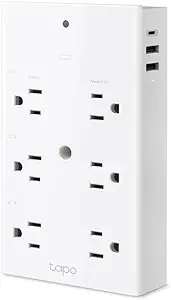
TP-Link Tapo Smart Plug Outlet Extender, Surge Protector, 18W Fast Charging, 3 Individual Smart Outlets, 1x USB-C & 2X USB-A, Smart Night Light, Works w/Apple HomeKit, Alexa & Google Home, Tapo P306
This Tapo P306 extends your power options with three individually controlled smart outlets plus three always-on outlets, making it ideal for crowded outlets or power strips. Its wide-spaced outlets prevent blocking larger plugs, and the 18W USB-C port ensures quick device charging. The built-in night light adds convenience for bedrooms or hallways, while compatibility with Apple HomeKit, Alexa, and Google offers flexible voice and app control. Compared to single-outlet smart plugs, this device consolidates multiple outlets into one compact unit, but its bulkier size may not suit tight wall spaces, and it lacks advanced energy monitoring. It’s perfect for those who need a versatile power hub with quick charging and smart automation in a single device.
Pros:- Nine-in-one design with 3 smart outlets and 6 total ports
- Wide-spaced outlets for large plugs
- Fast-charging USB-C port for quick device power-up
Cons:- Bulkier footprint may not fit in tight wall spaces
- No energy monitoring features
Best for: Users with multiple devices and limited outlets looking for a smart, all-in-one power extension with charging capability.
Not ideal for: People requiring detailed energy monitoring or tight wall fit in very small spaces.
- Number of Outlets:3 smart + 3 always-on
- USB Ports:1x USB-C, 2x USB-A
- Max Power:400W
- Compatibility:Apple HomeKit, Alexa, Google
- Surge Protection:900 Joules
- Size:Standard wall outlet size
Bottom line: Best for users seeking a comprehensive power extension with automation, multiple outlets, and fast charging in one device.
Switchbot Bluetooth Fingerbot Button Pusher for Rocker Switches – Turn Lights/Coffee On by App or Timer, No Tools, Optional Hub for Voice & Away Control, White
The Switchbot Fingerbot offers a simple, tool-free way to automate physical switches and buttons, making it ideal for those who want smart control without rewiring. Compared to the Fingerbot Touch, it’s less versatile on touch panels but excels at pushing rocker or toggle switches. Its strong adhesive ensures a secure mount, and scheduled timers allow automation even without the hub, which is optional for voice and remote control via Alexa, Google, or IFTTT. The primary tradeoff is limited compatibility with certain switch types, and the physical action may not work on stiff or aged buttons. This device makes the most sense for users who want an affordable, easy-to-install way to automate existing switches in a smart home setup.
Pros:- No wiring needed, tool-free installation
- Supports scheduling and timers in the app
- Optional hub for remote and voice control
Cons:- Limited compatibility with touch panels or stiff switches
- Physical pushing may not work on aged or stiff buttons
Best for: Homeowners wanting to automate rocker switches or basic buttons without wiring or complex setup.
Not ideal for: Users with touch panels, stiff switches, or those requiring extensive customization beyond push-button automation.
- Operation Mode:Push button
- Control Protocols:Bluetooth, Wi-Fi, Matter
- Max Current:1A
- Voltage:120V
- Size:Compact, adhesive mount
- Warranty:1 year
Bottom line: Ideal for those seeking a simple, wire-free way to automate rocker switches and buttons with scheduling and voice control options.
How We Picked
We evaluated these gadgets based on their performance, ease of use, build quality, and compatibility with popular smart home ecosystems. Devices had to demonstrate real versatility—either through multi-platform support or unique automation capabilities—while also maintaining reliable operation. We prioritized products that balance innovation with affordability, avoiding overly niche or complex options that might overwhelm typical users. The ranking reflects a combination of user convenience, feature set, and overall value, aiming to guide consumers toward devices that genuinely enhance their smart home experience.Factors to Consider When Choosing Innovative Smart Home Gadgets
When selecting innovative smart home gadgets, it’s essential to consider how each device integrates into your existing setup and meets your automation goals. The right gadgets should improve convenience without adding unnecessary complexity or expense. Understanding key factors like ecosystem compatibility, ease of installation, and intended use will help you avoid common pitfalls and get the most value from your investment.Compatibility and Ecosystem Support
Most smart home devices work best when they fit into a familiar ecosystem, whether that’s Amazon Alexa, Google Home, or Apple HomeKit. Choosing gadgets compatible with your existing platform ensures seamless control and automation. Overlooking this can lead to fragmentation, where devices don’t work well together or require additional hubs or bridges that add cost and complexity.
Ease of Installation and Use
Devices that require minimal wiring or setup tend to offer a more satisfying user experience. Fingerbots and smart switches that simply press buttons or replace existing switches are ideal for renters or those wary of electrical work. Conversely, more complex hubs or sensors might need professional installation or longer setup times, which can be frustrating for casual users.
Automation Capabilities
Look for devices that support customizable schedules, triggers, and integrations. Automation truly enhances smart home value, but not all gadgets are equal—some only work with specific apps or ecosystems. Consider whether you want simple remote control or advanced routines that interact with multiple devices for a truly smart environment.
Cost and Value
Higher-priced devices often offer more features or better build quality, but that isn’t always necessary for every user. Identify your priorities—if automation and sensors are key, investing more makes sense. For basic control or occasional automation, more affordable options can deliver excellent value without overpaying for features you won’t use.
Security and Privacy
With connected devices, security becomes critical. Devices that communicate over secure protocols and offer regular firmware updates help protect your data. Avoid gadgets that lack transparency about their data handling or rely on insecure connections, especially if they operate in sensitive areas like bedrooms or kitchens.
Frequently Asked Questions
Can I use these smart gadgets if I don’t have a smart home hub?
Many of these gadgets, like the Amazon Echo Show or certain fingerbots, can operate independently through WiFi or Bluetooth, reducing the need for a dedicated hub. However, some devices, especially sensors or automation controllers like the THIRDREALITY Smart Presence Sensor, rely on hubs or bridges (like Zigbee or Z-Wave) for optimal performance. If you prefer a simpler setup, choosing devices that work directly over WiFi can streamline your smart home ecosystem.
Are smart fingerbots reliable for daily automation?
Fingerbots and similar automation tools are effective for simple, repetitive tasks like pressing buttons or flipping switches, but they may encounter limitations with complex or high-frequency tasks. Their reliability depends on build quality and the precision of the motorized components. For critical or frequent automation, investing in higher-end models or combining them with other sensors can improve consistency and longevity.
How important is ecosystem compatibility when choosing smart sensors?
Compatibility is vital because it determines how seamlessly sensors and devices work together. An ecosystem like Alexa or Google Home simplifies automation and voice control, but it also means you’re more locked into that platform. In contrast, devices supporting multiple standards like Zigbee or Z-Wave provide flexibility and future-proofing, especially if you plan to expand your setup later.
What should I consider when combining multiple smart gadgets?
Compatibility, automation integration, and network stability are key factors. Ensure all devices support common protocols and can be controlled through a unified app or hub. Also, consider your WiFi network’s capacity, as multiple devices may strain bandwidth. Planning your setup to avoid signal interference and choosing devices with reliable cloud services can prevent frustration down the line.
Is it worth investing in premium smart home gadgets?
Premium devices often offer enhanced durability, advanced features, and better integration, which can be valuable if you rely heavily on automation or want a sleek aesthetic. However, for casual or budget-conscious users, more affordable options can deliver most functionalities needed for a smart home. Weigh your specific needs against the added cost to decide if the investment aligns with your automation goals.
Conclusion
For general users seeking an all-around smart home upgrade, the SwitchBot Hub 3 offers excellent versatility and ecosystem support. If you prioritize visual control and voice interaction, the Amazon Echo Show 5 and Echo Spot are ideal. Budget-conscious buyers or renters should consider fingerbots like the Switchbot Fingerbot Button Pusher or MOES Rock Switch for simple automation. For advanced automation and sensor needs, the THIRDREALITY Smart Presence Sensor R3 and eMotion Ultra Radar provide precise detection. Ultimately, selecting the best devices depends on your automation complexity, existing ecosystem, and budget constraints, but all these options push smart home capabilities forward in 2026. As an affiliate, we earn on qualifying purchases.Halloween Picks
halloween